Vixel
Audio drives the field.
Particles follow sound.
- 01 Input
- File, mic, or video
- 02 FFT
- Eight-band analysis
- 03 Field
- 60 FPS in browser
Browser native
No install. Drop audio or video, or use your microphone. Runs entirely client-side.
Audio reactive
Eight-band FFT drives Perlin flow and radial fields. Particles follow the frequency data.
Performance first
1600 instanced particles at 60 FPS with a single GPU draw call.
Pipeline
From waveform to vector field.
Vixel is a creative instrument, not a preset pack. The same audio analysis loop powers live mic sessions and file playback.
- 01
Load audio
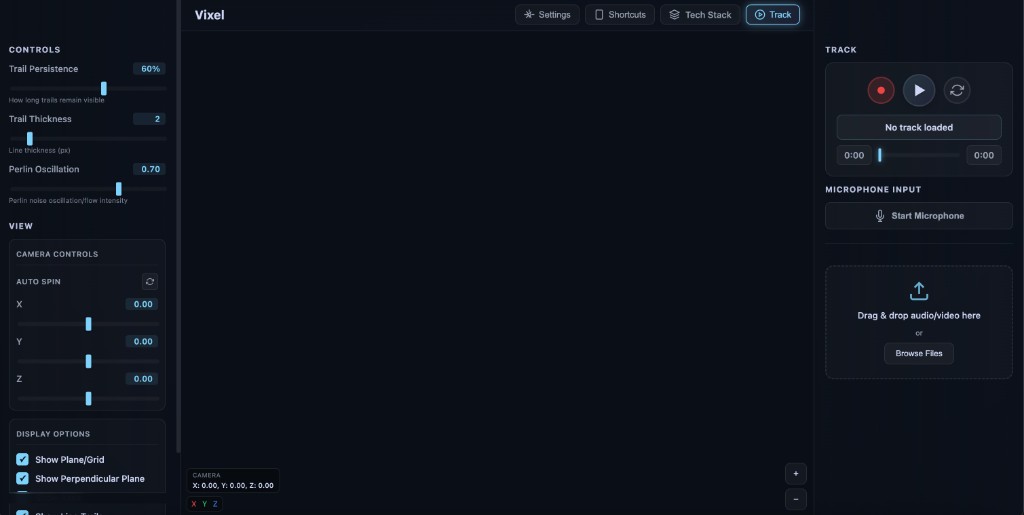
Drag a file, paste a video URL, or start the mic. Web Audio API handles capture and playback.
- 02
Map frequencies
Real-time FFT bands modulate vector field strength, direction, and color across the scene.
- 03
Watch the field
Three.js renders instanced particles with orbit controls, trails, and optional video backgrounds.
Capabilities
Built for live visuals.
- IN
Multiple inputs
File, microphone, or video texture as a reactive backdrop.
- REC
Recording
Capture WebM output and camera moves without leaving the browser.
- BEAT
Beat detection
Pre-scan worker and IndexedDB cache for smoother playback.
- MIT
Open source
MIT licensed. Fork, extend, and embed in your own creative stack.
Open the demo in your browser.
Full app at obetta.github.io/Vixel. Use headphones or a file you know — the field responds immediately.
Launch Vixel